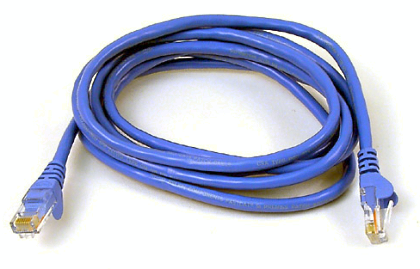

Okay when I say make don't get me wrong,I don't mean fashion some cable out of foil and used up dental floss McGyver style,I was strolling through town the other day and I came to notice that some people are making money out of things that absolutely make no sense.I was at Bloomerg searching for an ethernet crossover cable because the one I had made had backfired so I quite excited when I found out that cable was like 15 bob per metre and so I quickly made the purchase and I presented the good salesman with 15 shillings cash and stood there eagerly waiting to be given a complete cable only to be given the cable and the RJ-45 connectors(you can google it if you aren't sure)[which are 3 bob where I usually buy them but bought them for 10 bob there because I didn't feel like walking far] and told to proceed to there 'workshop' upstairs where I would get the crimping done.
Showing posts with label Windows tricks. Show all posts
Friday, November 27, 2009
How to make a network cable commando style
Okay when I say make don't get me wrong,I don't mean fashion some cable out of foil and used up dental floss McGyver style,I was strolling through town the other day and I came to notice that some people are making money out of things that absolutely make no sense.I was at Bloomerg searching for an ethernet crossover cable because the one I had made had backfired so I quite excited when I found out that cable was like 15 bob per metre and so I quickly made the purchase and I presented the good salesman with 15 shillings cash and stood there eagerly waiting to be given a complete cable only to be given the cable and the RJ-45 connectors(you can google it if you aren't sure)[which are 3 bob where I usually buy them but bought them for 10 bob there because I didn't feel like walking far] and told to proceed to there 'workshop' upstairs where I would get the crimping done.
Posted by
Jigsawman
at
7:57 PM
How to make a network cable commando style
2009-11-27T19:57:00+03:00
Jigsawman
Kenyan News|Windows tricks|
Comments
Categories:
Kenyan News,
Windows tricks
Monday, June 1, 2009
Download with ease using Jdownloader
One big problem with downloading from file hosting sites is the inability to automate the download process forcing downloaders to be constantly monitoring their downloads because of the inability to queue downloads due to things such as countdown timers or captcha boxes such as that on Megaupload.Thanks to the guys over at Jdownloader they made a program that could automate the process without much hustle requiring you only to input the link
The program was built especially for file sharing sites and has various feautures to make downloading much easier,here are some of them
Platform independent. (Windows, Linux, Mac, ..)
Runs on Java 1.5 or higher
Complete Open-Source (GPL)
Completely portable-No need for installation
Download several files parellel
Download with multiple connections
JD has an own powerful OCR module (JAntiCaptcha)
Decrypt RSDF, CCF and DLC Containerfiles
Decryptplugins for many services. e.g. sj.org, UCMS, WordPress, RLSLog….
Youtube, Vimeo, clipfish video and Mp3 Download
Automatic extractor (including password list search) (Rar archives)
Theme Support
Multilingual
About 110 hoster and over 300 decrypt plug-ins
Reconnect with JDLiveHeaderScripts: (1400 router supported)
Webupdate
Integrated package manager for additional modules (eg. Webinterface, Shutdown)
For more info check out the jdownloader homepage
Posted by
Jigsawman
at
8:53 PM
Download with ease using Jdownloader
2009-06-01T20:53:00+03:00
Jigsawman
free software|Internet tricks|Windows tricks|
Comments
Categories:
free software,
Internet tricks,
Windows tricks
Sunday, March 1, 2009
Can't see google ads,got Kaspersky?
I recently added kaspersky 2009 to the long list of programs protecting my computers from viruses but as soon as I finished the installation when I cam to check on the blog I noticed my ads were not showing.After several failed attempts at re-adding the ad code I realized that the ad code was fine and that Kaspersky was the one blocking my ads.I usually don't notice ads that much but since I was in the process of changing my template I had to be able to see what I was editting
So here is what I did to get them back
1.Open the kaspersky window
2.Click on the content filtering sidetab
3.Under Banner Ad blocker you should see something that says 'White' and 'Black' list with a clickable button on its right
4.Click this and you will be taken to the Banner ad blocker window
5.Click on the white list tab and then add the following address mask(URL) *google*
6.Then click on OK and once you reload your page the ads will be back.
Saturday, February 14, 2009
Free antiviruses you can try out
Antiviruses have these days become a must have and if you don't have one you better get one fast,but usually antiviruses cost money and no one feels like paying for something which they will only use for a year so if you have the same problem I have you can check out some of these free antiviruses.
1.Avira
size:21 MB
features:
1.Inbuilt antivirus
2.Antidialer to prevent illegal premium calling
3.Fast system scan speeds
4.Good user interface
5.Anti-phishing function that prevents hackers from stealing your bandwidth
Remark:Very good for a free antivirus and also a small file to download
Visit download page for Avira here
2.Bitdefender
features:
1.Inbuilt antivirus
2.On demand and scheduled scanning
3.Skinnable user interface
4.Quarrantine for infected files
5.Detailed scan reports
Remark:Not a bad software but you have to give them an email address before you can download it.
Download it here
3.Avast home edition
size:30 MB
features:
1.Inbuilt antispyware
2.easy to use user interface
3.P2P and IM shields
4.Web scanner
5.Special quarrantine that enables use of infected files without harm to the computer
6.Automatic update
7.Shell integration
and many other just to name a few.
Remark:A more functional antivirus than the rest and therefore I would recommend this one.
Download it from here
4.Rising free antivirus
Size:60 MB
features:
1.Antivirus & Antispyware Protection
2.File Monitor: Automatically detects viruses in active files and prevents them from infecting your computer.
3.Email Monitor: Scans inbound (POP3) and outbound (SMTP) emails for malware.
4.Application Control: Monitor the operational status of applications and block suspicious activities.
5.Malicious Behavior Interceptor: Monitors programs in the system for possible malicious behavior.
6.USB/CD/DVD Monitor: Blocks malware on USB storage media, CDs/DVDs and network drives.
7.Embedded Scan: Provides integrated protection for instant messengers, download managers and other popular tools.
8.Self-Protection: Prevents malware from making changes to the Rising Antivirus software.
Remark:Quite an unknown antivirus but it is still worth a try
Download it here
Saturday, February 7, 2009
Run Windows applications on MacOS or Linux
This must be one of the most interesting programs that I have come across and it is a program called Wine which basically allows you to run Windows applications and games on most of the other operating systems as they would normally run therefore without performance handicaps like other emulators
The program is very unique in that it does not act as an emulator but a translator enabling the software to run as if it was running under Windows.
Many programs have been found to work on Wine such as;
Photoshop CS3
AutoCAD
Utorrent and many others
Some games confirmed to be working on it are;
Call of duty 4
Bioshock
Left for dead 4
Command and conquer just to name a few
If you are interested you can download the file here or visit there homepage
Download
Homepage
Sunday, December 7, 2008
Remotely access computers via internet using Gbridge
Gbridge is a free software that lets you sync folders, share files, chat and VNC securely and easily. It extends Google's gtalk service to a collaboration VPN (Virtual Private Network) that connects your computers and your close friends' computers directly and securely.The software allows you to do various activities between 2 computers such as;
-Access your computer desktop remotely or share your desktop with your friend from anywhere which is referred to as Desktop Share
-Securely share files among your own computers, so you can remotely access your files, e.g. play mp3 , with ultimate privacy. Securely share files to your designated friend, so the selected friend can instantly view the auto-generated photo thumbnails and slideshow remotely. No web upload/download needed! which is called SecureShare
-Transfer big files and sync folders from/to anywhere has never been easier. Auto schedule, auto resume, incremental and no size limit! which is called AutoSync and much more....
You can view more screenshots or download the software free from the Gbridge homepage
Saturday, December 6, 2008
Copy files fast with teracopy

In this day and age removable storage has become the in thing and therefore copying files to these storage devices is quite easy if its a few MBs but what if we are talking about hundreds of gigabytes,it might take a little time with the Windows standard copy feature and so I found an alternative software that cuts copy time tremendously.The software is called Teracopy and here are some of its features
-Copy files faster. TeraCopy uses dynamically adjusted buffers to reduce seek times. Asynchronous copy speeds up file transfer between two physical hard drives.
-Pause and resume file transfers. Pause copy process at any time to free up system resources,this is a very handy feature if your computer always brings problems during copying.
-Error recovery. In case of copy error, TeraCopy will try several times and in the worse case just skips the file, not terminating the entire transfer.
-Interactive file list. TeraCopy shows failed file transfers and lets you fix the problem and recopy only problem files.
-Shell integration. TeraCopy can completely replace Explorer copy and move functions, allowing you work with files as usual.
-Full Unicode support.
You can get the software free from the teracopy homepage:Download.
Monday, November 17, 2008
How to prevent viruses from spreading to your computer from USB drives
One major way through which viruses spread these days is via USB pen drives and apparently for every 100 pen drives 10 have viruses on them.So somebody came up with an application that can prevent these viruses from spreading to your computer.
The program is called iKill and what it does is it searches for removable drives and then parses the autorun file of a virus preventing it from infecting your computer.It also has the ability to delete these viral files automatically or after prompt by user.
The application is free and can be downloaded from this website:Download
Tuesday, July 29, 2008
Edit MP3 tags using Windows media player
If you want to edit the tags of your mp3s there is a very easy way to do it using windows media player which usually comes with the windows operating system and here is how to do it.
Step 1
Open the file in windows media player and click on the library tab
Step 2
Right click on the file you want to edit and select Advanced tag editor from the drop down menu
From here you can now edit all the details and also add album art if you wish
Step 1
Open the file in windows media player and click on the library tab
Step 2
Right click on the file you want to edit and select Advanced tag editor from the drop down menu
From here you can now edit all the details and also add album art if you wish
Posted by
Jigsawman
at
8:55 PM
Edit MP3 tags using Windows media player
2008-07-29T20:55:00+03:00
Jigsawman
Windows tricks|
Comments
Categories:
Windows tricks
Subscribe to:
Posts (Atom)